The Product Designer Role
Most explanations of what a product designer does are written for people trying to get hired as product designers. They talk about “solving user problems,” “designing systems,” and “driving business impact.” These are all true, but they’re abstract. If you’re paying someone $100K–$200K per year (or $10K–$20K per month as a contractor), you need to know what that actually means. What do they deliver? What should they accomplish? How do you know if they’re adding value or just making things look nice?
What Product Designers Actually Deliver
At the highest level, a product designer’s job is to ensure that the product being built (AI, UX, and software all together) is solving a real problem for real people, and that it’s designed in a way that’s usable, cohesive, and aligned with business goals.
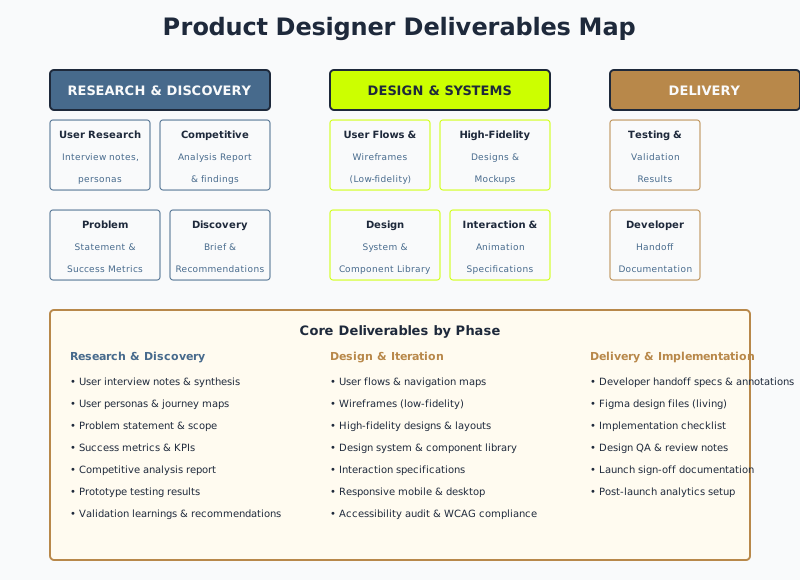
In practice, this means:
1. Clarity on What You’re Building (and Why)
Before anyone writes code or designs an interface, there needs to be agreement on: What problem are we solving? Who are we solving it for? How will we know if we’ve succeeded?
A product designer leads this discovery. They interview stakeholders, talk to users, do competitive research, and synthesize all of that into a clear problem statement and success metrics.
What this looks like:
- A discovery document (10–20 pages) that everyone can read and agree on
- A defined target user (not “everyone,” but a specific persona)
- Success metrics that are measurable (not “users will be happy,” but “80% of new users will complete onboarding in under 5 minutes”)
- Scope boundaries (what’s in for launch, what’s future work)
Why this matters: Most products fail because they’re solving the wrong problem, not because they’re poorly designed. A product designer prevents that.
2. Research and Validation
A product designer doesn’t design from assumptions or gut feelings. They research. They talk to users. They test assumptions and validate direction before committing to a costly development cycle.
What this looks like:
- User interviews (5–12 people) to understand pain points and behaviors
- Competitive analysis (what patterns do users expect based on other products?)
- Prototype testing (low-fidelity prototypes tested with 5–8 users to validate direction)
- Usage analytics review (if you have existing data, what does it tell you?)
- Iterative validation (test, learn, adjust, test again)
Why this matters: Testing direction before you build it is 10x cheaper than building something and then discovering users don’t want it.
Key Signal
A strong product designer spends 2–4 weeks doing research and talking to users before showing you any wireframes. If they're showing designs in the first week, they're not doing enough discovery work.
3. User Flows and Information Architecture
Once you know what problem you’re solving, the designer maps out how users will move through the product. This includes:
- User flows: Step-by-step paths through the product (how someone creates an account, how they get to the feature they need, what happens when something goes wrong)
- Information architecture: How content and features are organized and labeled
- Wireframes: Low-fidelity mockups showing structure and layout (not colors, not final visual design—just where things go)
What this looks like:
- Flow diagrams showing different user pathways
- Wireframes for each major screen
- Clear labeling and navigation architecture
- Consideration of edge cases (what happens if a user has no data? What happens if they have 1,000 items?)
Why this matters: Users should be able to find what they need without thinking. Bad information architecture means users get lost. The designer’s job is to make the structure obvious.
4. High-Fidelity Designs and Design Systems
Once the flows and structure are right, the designer creates high-fidelity designs—what the product actually looks like. This includes:
- High-fidelity mockups: Actual layouts with real typography, colors, spacing, and images
- Design system: Reusable components (buttons, cards, forms, modals) with clear guidelines
- Interaction specifications: How buttons respond when clicked, what error messages look like, how transitions work
- Responsive design: How the product looks and works on mobile, tablet, and desktop
What this looks like:
- Complete design files in Figma (living, editable files—not PDFs that become outdated)
- Documented component library with usage guidelines
- Annotated specifications for developers (spacing, colors, animations)
- Mobile and desktop versions
Why this matters: Developers need a clear blueprint to build from. A design system also ensures consistency—every button looks the same, every form works the same way.
5. Accessibility and QA
A good designer ensures the product is usable for everyone, including people with disabilities. This includes:
- WCAG compliance review (keyboard navigation, color contrast, screen reader support)
- Edge case design (what happens with long text, lots of data, many users?)
- Design QA (checking for consistency, completeness, and correctness)
What this looks like:
- WCAG accessibility report and recommendations
- Comprehensive design documentation
- QA checklist of all screens and states
- Guidance on how to build accessibility into the code
Why this matters: Inaccessible products exclude users and create legal liability. Accessible products are better for everyone.
6. Development Support and Handoff
Design doesn’t end when the designer hands off to developers. It continues through implementation. The designer answers questions, resolves ambiguities, and ensures the built product matches the intent.
What this looks like:
- Available during development to answer questions
- Design review of in-progress work
- Collaboration on technical tradeoffs (performance vs. polish)
- Accessibility and QA sign-off before launch
Why this matters: Developers will have questions. Without a designer involved, those questions get answered poorly, and the product drifts from intent.
Common Failure Mode
Designer finishes designs and moves to the next project. Developers have questions about edge cases. Decisions get made in Slack without design input. Built product looks different from designed product. Everyone's disappointed.
What Product Designers Don’t Do
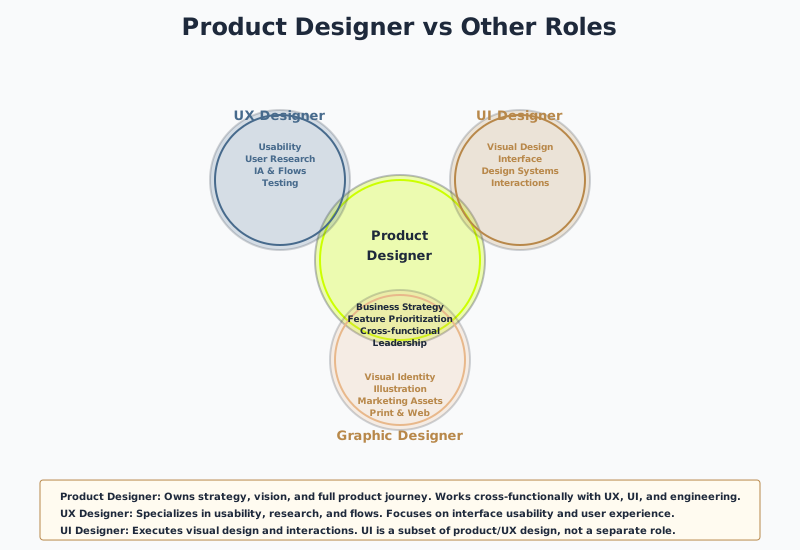
It’s important to be clear about what product designers don’t do (or shouldn’t do, if they’re a strong designer focused on their core work):
Product designers don’t code. They design the experience. Engineers build it. Sometimes designers know how to code, and that’s useful context, but coding isn’t their primary job.
Product designers don’t make solo business decisions. They inform decisions. They bring user research, competitive analysis, and strategic thinking. But the executive team, product leadership, and stakeholders make the final calls.
Product designers don’t do marketing or branding. They design the product experience. Marketing and brand teams figure out how to position and sell it. (There’s overlap—brand guidelines inform product design—but marketing strategy isn’t the designer’s job.)
Product designers don’t design the backend or data architecture. They design the user-facing experience. The engineering team or architect owns how data flows, how the system scales, what the API looks like.
Product designers don’t do graphic design, illustration, or video production. They might collaborate with those specialists, but they’re not usually the ones executing. If your designer is spending 20% of their time illustrating, something’s wrong with your staffing.
Product designers don’t manage other designers or product managers. Leadership and management are different skill sets. A strong designer can influence and guide, but if they’re managing 3 people and designing, they’re doing two jobs poorly.
Product designers don’t own the roadmap by themselves. They influence it based on research and strategy, but they don’t make solo prioritization decisions. That’s a product leadership conversation.
Questions to Ask
If you're hiring a product designer, are you clear on what they're not responsible for? Are they going to be asked to do marketing, branding, graphic design, or coding? If so, you need to hire for multiple roles or adjust expectations.
How Product Design Connects to Development
Product design and development should be deeply connected. Here’s how:
Early connection (during design): A developer (or tech lead/architect) should be involved during design, especially for larger projects. They can flag technical constraints early. “That infinite scroll interaction will require a streaming API we don’t have.” “That real-time collaboration feature requires a different architecture than we planned.” Better to learn that during design than during implementation.
Handoff and specification: The designer creates a specification that developers can build from. This includes:
- User flows (what users can do)
- Wireframes and high-fidelity designs (what the UI looks like)
- Interaction specifications (how the UI responds)
- Data and API requirements (what information needs to flow where)
- Accessibility requirements (WCAG standards, keyboard navigation, etc.)
During development: The designer is available to answer questions and make real-time decisions. Developer: “The design shows a hover state for this button. What should happen on touch devices?” Designer: “Good catch. Here’s the mobile interaction spec.”
QA and refinement: Before launch, the designer does a final review. They check that the built product matches the design intent. They catch bugs. They make final adjustments.
Post-launch: The designer monitors how users interact with the product. Analytics might show that a feature isn’t being used as expected. User feedback might reveal confusion. The designer works with the team to improve.
Why this connection matters: Products built without designer involvement often look different from designed products. Features work but feel disconnected. Edge cases weren’t designed. The result is a product that technically works but feels rough around the edges.
How to Evaluate Product Designer Value
You’re paying someone a lot of money. How do you know if they’re earning it?
Good signs:
-
They ask hard questions before designing. Why are we building this? What does success look like? Who are we building for? If they’re not asking these, they’re not doing the job.
-
They do research and test assumptions. You see evidence of user interviews, competitive analysis, and prototype testing. They’re not designing from gut feelings.
-
You have clear, documented decisions. There’s a discovery brief. There’s a design rationale. When they say “we should organize the dashboard this way,” they can explain why (not just “it looks cleaner”).
-
They work across AI, UX, and software. They’re talking to developers, understanding technical constraints, and ensuring the team is aligned.
-
The design system grows and improves. They’re not just designing individual screens; they’re building a reusable system that makes future design work faster.
-
Edge cases are designed. They’ve thought about what happens when a user has no data, lots of data, slow internet, or uses a screen reader. The product works in those scenarios, not just the happy path.
-
Designs are in living files, not static PDFs. They’re maintaining Figma files, not emailing updated mockups.
-
You can trace business metrics. After launch, the product performs better on the metrics you defined at the start. Users complete tasks faster. Retention improves. Conversion goes up.
Bad signs:
-
They jump to designing without understanding the problem. You ask for a discovery phase and they say “let’s just start designing.”
-
Designs are pretty but unclear. You look at the mockups and you’re not sure how users will interact with them. There’s no specification for developers.
-
Edge cases aren’t designed. If users have no data, the product breaks. If text is too long, the layout falls apart. If you use it on mobile, everything’s jumbled.
-
No user research. All decisions come from “I think users will like this” or “I saw this pattern on another site.” No actual user feedback.
-
Design system is weak or ignored. Every screen uses different buttons, different spacing, different typography. Consistency is low.
-
Design and development are disconnected. The designer finishes and hands off. Developers have questions that don’t get answered. The built product looks different from designed product.
-
No metrics or accountability. You don’t measure whether the design actually improved the product. You just have pretty screens.
-
They’re doing work outside their scope. They’re coding, managing other designers, doing branding, doing marketing. They’re stretched too thin and not doing core design work.
Key Signal
Six months after launch, you should be able to measure the impact of design work. Did it help? Did you meet the success metrics? If you can't answer that, you're not measuring value.
The Cost of Skipping Design
If you’re tempted to skip hiring a product designer to save money, consider:
-
Shipping the wrong product: You spend 6 months building something users don’t want. Cost: $200K+ in wasted development.
-
Building more than you need: Without a designer prioritizing, developers build every feature requested. The product is bloated and confusing. Cost: slower development, higher maintenance burden.
-
Poor user experience: Developers build what the brief says, but no one thought through how it actually works. Users struggle. Retention is low. Cost: lower revenue, more support tickets.
-
Technical debt: Without design thinking about scalability and reusability, developers build one-off solutions. Future changes are expensive.
A strong product designer costs $100K–$200K per year (or $10K–$20K per month as a contractor). A failed product launch costs 10x that.