The Total Cost Analysis Framework
Every AI tool vendor has a comparison chart. It’s always the same: a grid showing their product on the left (green checkmarks everywhere) and competitors on the right (red X’s scattered strategically). The chart proves they’re better.
It proves nothing. It’s marketing.
The reason is simple: vendors pick the features that make them look good. Nobody puts “ease of integration with your legacy CRM” on the comparison chart because that’s not sexy. Nobody puts “how long until ROI” because the answer might be 9 months, not 2 weeks. Nobody puts “total cost of ownership including training and implementation” because that’s usually 3-5x the software cost.
If you’re comparing AI tools for your small business, feature lists will mislead you. You need to compare on what actually matters: real cost to implement, real cost to maintain, and real probability that it will work for your specific use case. The approach in this guide mirrors the vendor evaluation framework described in our technology partner selection guide, but with AI-specific costs in mind.
Why Feature Lists Lie
Let’s take a real example. You’re looking at AI customer support tools. The vendors’ marketing says:
Tool A: “99 supported integrations, advanced analytics, 24/7 support, sentiment analysis, multi-language support, white-label options, API access, custom workflows, real-time reporting.”
Tool B: “20 supported integrations, basic reporting, email support, English only, no white-label, no API.”
Tool A sounds better. And their comparison chart shows Tool A beating Tool B on 8 out of 10 dimensions.
But if you’re a small business, here’s what actually matters:
- Do you need 99 integrations or 5? You probably need Zendesk, Gmail, Slack, your CRM, and maybe Zapier. You don’t need 99. So Tool A’s 99 integrations are a feature you’ll never use, padding their feature list.
- Do you need white-label? If you’re a 20-person company, no. You’re not reselling this tool. You’re using it internally.
- Do you need multi-language support? If all your customers speak English, no. This feature is in Tool A’s chart because it serves their enterprise buyers, not you.
- Do you need advanced analytics or just to know how many tickets your AI handled? If it’s the latter, basic reporting is fine.
What you actually need to know:
- How long does it take to set up a new AI response to a common question?
- When the AI gets it wrong, how easy is it to correct it?
- How much does it actually cost per month when you factor in training, setup, and integration?
- What happens when you hit their limits (token count, message volume, integrations)?
- How long until ROI?
None of that is on the feature chart.
Key Signal
When evaluating AI tools, ask to see the worst-case scenario price. A vendor quotes $500/month for unlimited messages, but the fine print says "up to 100,000 messages." You'll go over. Ask: "When I hit the limit, what's my actual monthly cost?" If they won't give you a number, assume it's 2-3x the base price on high-usage months.
The Hidden Costs Nobody Talks About
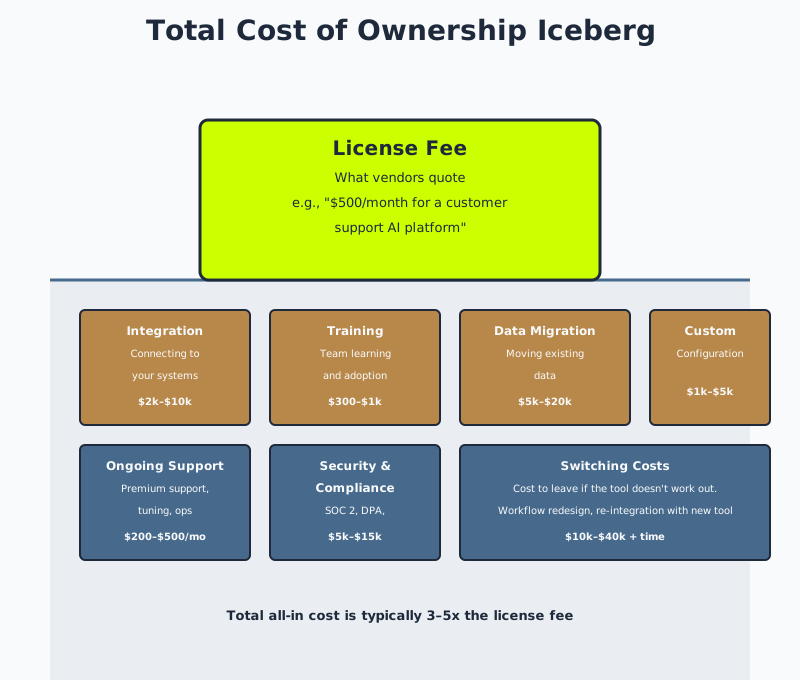
When a vendor quotes you a price, that’s rarely the full cost. Here are the categories of hidden costs that will surprise you:
Training and onboarding. You’re not going to launch an AI tool and have your team use it perfectly on day one. Someone needs to learn the platform, learn the limitations, learn how to set it up properly. Most small businesses budget 2-4 hours for this and it takes 8-16 hours. Cost: $300-1,000 in salary. Vendor cost: $0, but it comes out of your budget.
Integration consulting. “We integrate with Zendesk,” a vendor will tell you. What they don’t say: “We integrate with Zendesk through a pre-built connection that works 85% of the time, and the other 15% of the time you need to use Zapier or hire a developer.” If you need Zapier, you’re paying another $30-50/month. If you need a developer, that’s $2,000-10,000 depending on complexity.
Usage overage fees. Every AI tool has limits. “Up to 1,000 messages per month” or “up to 100,000 tokens per month.” You’ll go over. You’ll realize you went over because you got a surprise bill at the end of the month. The vendor will tell you they warned you (in 8-point font in their Terms of Service). Cost: $200-1,000/month in overages if you’re not careful.
Data migration. If you’re switching from one customer support tool to another, your existing data needs to migrate. Vendors will say “we offer data migration” and then it takes 8 weeks and requires a developer from your side to manage the process. Cost: hundreds of hours of internal time, or $5,000-20,000 if you hire a consultant.
Compliance and security reviews. If you’re processing customer data, you probably need the vendor to sign a Data Processing Agreement, pass a security audit, get SOC 2 certified, etc. Vendors will have this… eventually. You’ll wait 2 weeks. Then you’ll need legal to review it. Then there will be 5 rounds of negotiations. Cost: 40-60 hours of legal time, or $5,000-15,000 if you hire a lawyer.
Support escalations. The vendor’s support is email-based and slow. You hit a critical issue and their first response is 6 hours later. You need phone support. That costs extra—usually $200-500/month for a small business. Or you solve it yourself by reading documentation and YouTube videos. Cost: 20-40 hours of your time.
The switching cost to leave. You implement an AI tool, it’s integrated into your workflow, it’s in your data pipeline, and then you realize it’s not working. Now you need to switch tools. But the new tool doesn’t integrate the same way. You need to retrain your team. You lose 6 months of tuning and configuration on the old tool. This cost is huge and almost nobody accounts for it. Budget for it anyway. Cost: 200-400 hours of internal time.
Common Failure Mode
You implement an AI customer support tool. It works okay for 3 months. Then the vendor changes their pricing model—doubles the per-message cost or adds new limits. You now want to switch. But you've configured 47 response templates, trained your team on how to use the tool, and integrated it with your Zendesk setup. Switching costs $15,000 in consulting fees plus 40 hours of your team's time. You're locked in. You won't switch. You'll just pay the new price and resent the vendor. This is why asking about switching costs upfront matters as much as asking about setup costs.
How to Compare AI Tools Honestly
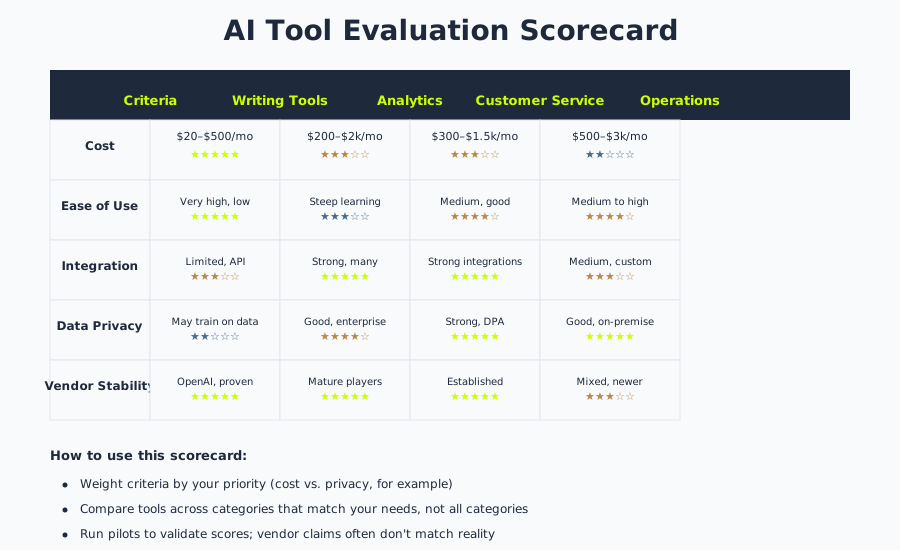
Stop comparing features. Start comparing these categories:
Implementation cost and timeline.
- How long does setup take? (Vendor will say 48 hours. Reality: 3-4 weeks.)
- What integrations require manual work vs. native plugins? (If more than 2 require manual work, that’s a red flag.)
- Do you need a developer to implement this or can your internal team do it? (If you need a developer, add $3,000-10,000.)
Monthly cost variability.
- What are the usage limits? (How many messages, queries, API calls?)
- When you exceed limits, what happens? (Do you get throttled? Do you get charged overage fees?)
- What’s the worst-case monthly cost if you use the tool heavily? (Not the base price—the real worst-case number.)
Learning curve and support.
- How long until your team is productive on this tool? (2 weeks? 6 weeks? 3 months?)
- When something breaks, how long is average support response time? (If it’s more than 4 hours for a critical issue, that’s a problem.)
- Is there good documentation? (Try to learn the tool from the docs alone, without asking for help. If you can’t, the docs are bad.)
Lock-in risk.
- How hard is it to get your data out if you want to leave? (If you can export it in 30 minutes, low risk. If you need a consultant to do it, high risk.)
- How customized would your setup be? (The more customized, the harder to move. Generic setups are easier to leave.)
- How much would you need to reconfigure if you switched tools? (If you’d need to retrain your team, that’s a real cost.)
Probability of ROI.
- How much is the tool actually going to save you? (Not what the vendor claims—what independent customers say.)
- In what timeframe? (If ROI is 12+ months, it’s riskier.)
- What are the failure modes? (Where does this tool typically not work or disappoint?)
To get real answers on these, do two things:
-
Talk to actual customers. Not the three customers the vendor provides as references. Find customers on G2, Capterra, or ProductHunt. Email them. Ask them: “Does this tool actually work? What took longer than expected? Would you buy it again?” You’ll get better answers than from vendor conversations. This is a core part of the reference check process.
-
Run a real pilot. Not a demo. A pilot. Implement the tool with real data, real integrations, real workflows. Run it for 4 weeks. Measure whether it actually moved your metric. Then decide. This approach is detailed in our guide on how to evaluate any technology partner.
Questions to Ask
When talking to reference customers, ask specifically: "What surprised you during implementation?" and listen for integration issues, unexpected complexity, or team adoption friction. Then ask: "If you were starting over, would you pick the same tool?" The hesitation in their answer tells you everything. A confident "yes" means the tool delivered on its promise. A "well, it depends" or "probably" means they've made peace with compromises.
The Realistic Cost of Popular AI Tool Categories
Here’s what it actually costs (not what vendors quote) for different categories of AI tools:
AI customer support / chatbots:
- Software: $300-1,500/month (Intercom, Zendesk, custom build on OpenAI API)
- Setup and integration: $2,000-8,000 (or 2-4 weeks of your team’s time)
- Monthly ops: $500-2,000 (for tuning, training the model, handling edge cases, support escalations)
- Total all-in monthly cost: $800-3,500/month for the first 6 months, then $500-2,000/month ongoing
- Timeline to ROI: 3-6 months if you have dedicated support staff. 12+ months if you don’t.
AI content writing / marketing copy:
- Software: $20-500/month (ChatGPT Plus, Jasper, Copy.ai, or API costs)
- Setup: $500-2,000 (configuring templates, training your team)
- Monthly ops: $1,000-3,000 (editing AI outputs, quality control, managing brand voice)
- Total all-in monthly cost: $1,500-3,500
- Timeline to ROI: 6+ months because someone still needs to edit everything. If you’re using this wrong (letting AI generate final copy without editing), you’ll damage your brand.
AI data analysis / business intelligence:
- Software: $200-2,000/month (Looker, Tableau, Sisense, or custom build)
- Setup and integration: $5,000-20,000 (connecting to your databases, building dashboards)
- Monthly ops: $500-2,000 (maintaining dashboards, updating data definitions)
- Total all-in monthly cost: $700-2,500
- Timeline to ROI: 6-9 months. High upside if you’re making decisions based on data.
AI recruiting / screening:
- Software: $500-3,000/month (HireEZ, Pymetrics, Greenhouse with AI, or custom build)
- Setup: $1,000-5,000
- Monthly ops: $500-1,500 (reviewing screened candidates, tuning the model)
- Total all-in monthly cost: $1,000-4,500
- Timeline to ROI: 3-6 months if you hire frequently. Not worth it if you hire rarely.
Custom AI models / fine-tuning:
- This is 10x more expensive than any of the above. Don’t do it unless you have specific data and a specific problem that off-the-shelf tools can’t solve.
- Budget: $30,000-100,000 to build and fine-tune something proprietary.
The pattern is clear: all-in costs are 2-5x the software cost. Any ROI calculation that ignores implementation and ongoing operations is fiction.
Key Signal
If a vendor won't answer "what's the real, worst-case, all-in monthly cost including overages?" they're hiding something. Push for a number. If they get vague, walk away. You don't need their product badly enough to buy blind. There's always another tool. A vendor confident in their pricing will show you the worst-case scenario and explain why it's still worth it.
The 4-Week Pilot Evaluation Process
Here’s the process we recommend for evaluating an AI tool:
Week 1: Setup and integration.
- Install the tool or sign up for access.
- Connect it to your systems (CRM, email, ticketing, database, etc.).
- Try to do this with your internal team, not with support. See where they get stuck.
- Document the actual time this takes.
Week 2-3: Train and tune.
- Have the team member who will actually use this every day configure it and get comfortable with it.
- They should set up 5-10 common use cases.
- They should make 10-20 mistakes and learn from them.
- They should use it on real data or real workflows.
Week 4: Measure.
- How much time did this actually save?
- How much time did quality control take?
- What frustrated the team?
- What worked better than expected?
- If you had to use this for a full year, would you?
At the end of Week 4, you have a data point. Not a feeling. Not a feature list. A real data point: “This tool saved us 5 hours per week and cost us 20 hours to implement, so we break even in 4 weeks.” Or: “This tool saved us 2 hours per week but required 40 hours of setup, so we break even in 5 months, and the integration with our CRM is fragile.”
Then decide based on that data point.
Conclusion
Vendors will try to convince you based on features. Ignore them. Vendors will try to minimize hidden costs. Don’t believe them.
Compare on implementation cost, learning curve, probability of ROI, and lock-in risk. Run a real pilot. Measure real outcomes. Then decide.
The wrong AI tool is more expensive than not having an AI tool at all. The right AI tool is worth 10x the cost. The difference is in the evaluation.
Related Guides
- The Honest Guide to AI for Small Business in 2026 — Is AI even worth considering for your business?
- What Good AI Consulting Actually Looks Like — When should you bring in outside help?
- How to Evaluate a Technology Partner — The vendor evaluation framework that works for any tool
- Technology Vendor Due Diligence Checklist — Specific questions to verify before buying
- Reference Checks for Technology Partners — How to get honest answers from real customers
- How to Select a SaaS Vendor — Most AI tools are SaaS; this guide covers SaaS-specific evaluation